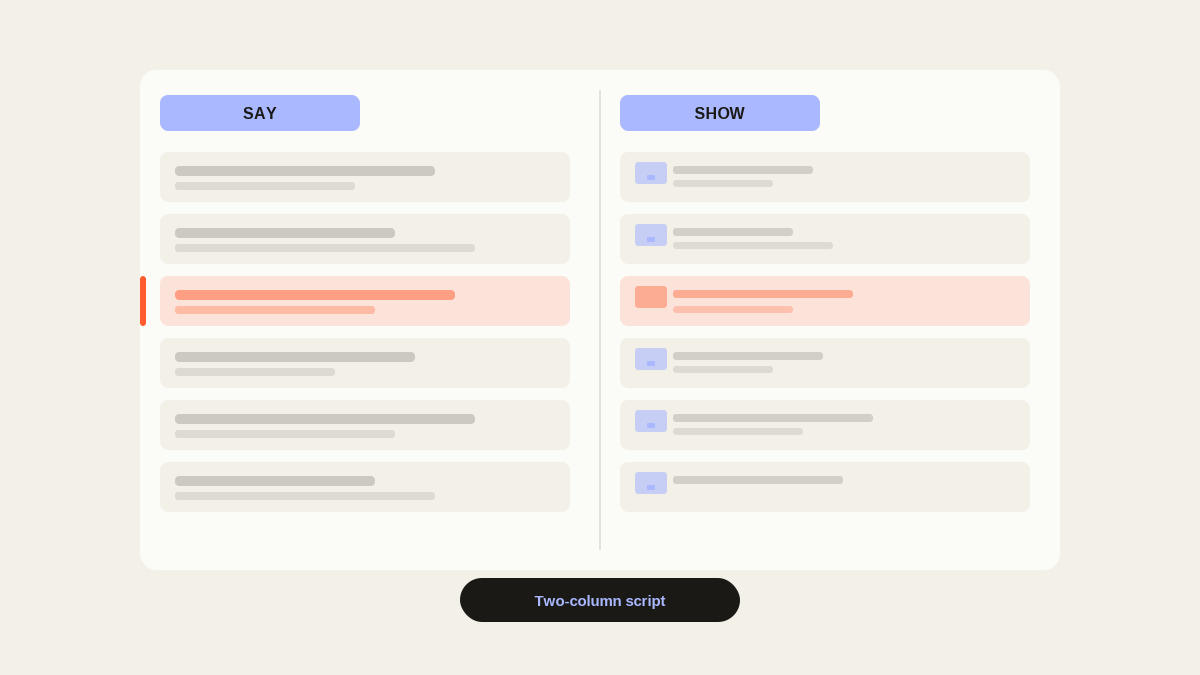
The two-column format that keeps your tutorial on track from the first sentence to the last.
A tutorial without a script is a conversation with yourself on camera. You explain the same thing twice, forget a step, go back and cover it again. Viewers leave. A script does not make you sound scripted - it makes you sound like you knew what you were going to say.
This article gives you a structure for a short tutorial - five to ten minutes - and a format for writing it so you know both what to say and what your viewer should see at every moment.
Two columns, one purpose
A tutorial script has two tracks running at the same time: the spoken words and the visuals. Most creators write only the spoken part and improvise the rest. That leads to long pauses while switching screens, or moments where you are describing something the viewer cannot see.
The two-column format solves this. The left column is what you say. The right column is what you show. They advance together, line by line.
| What to say (spoken) | What to show (visual) |
|---|---|
| "Today I'll show you how to set up a content calendar in fifteen minutes." | Screen: blank Notion page open |
| "Start by creating a new database - click New, then select Table." | Screen recording: cursor moves to New → Database → Table |
| "Give it a name. Something like 'Content 2026' is fine." | Screen: cursor in the title field, typing the name |
| "Now add the first property: Status. Click the + icon on the right." | Screen: cursor on the + button, dropdown appearing |
The four-part structure
Short tutorials follow the same shape whether they are two minutes or ten. Here are the four parts, in order:
- Hook - one sentence that says what you will show and why it is worth watching
- Setup - any context the viewer needs before you start: what tool, what starting state, what they need ready
- Steps - the tutorial itself, one step at a time, with both spoken and visual notes
- Wrap - a one-sentence summary and one clear next action for the viewer
Writing the hook
A hook is not an introduction. It is a promise. Compare these two opening lines:
"Hi everyone, today I want to talk about content calendars and how you can use them..."
- Weak - describes the topic without making a promise
"If you're posting without a plan, you'll post nothing when it matters. I'll show you how to fix that in fifteen minutes."
- Strong - makes a specific promise to a specific problem
Write the hook last. Once you know what the tutorial covers, you will know what promise to make.
Writing each step
Each step in the steps section follows the same three-part shape:
- State what you are about to do (one sentence)
- Do it, narrated in real time
- Name the result - what the viewer should now see or have
Keep each step to thirty seconds or less. If a step runs longer, it is two steps. Short steps are easier to follow and easier to re-record if something goes wrong.
A filled example
Here is a three-step excerpt from a tutorial on setting up a content calendar, using the two-column format:
| What to say | What to show |
|---|---|
| "The first thing you need is a database. In Notion, go to New Page and choose Table." | Screen: New Page menu → Table selected |
| "Name it something simple. I use the year - 'Content 2026'." | Screen: cursor in title field, typing |
| "Now add four properties: Status, Channel, Publish Date, and Draft Link. Let's start with Status." | Screen: + button in column header → Select option → Status |
Your blank template
Use this structure as a starting point for any short tutorial. Fill in the right column as you write each spoken line - do not leave it blank and plan to improvise.
| Part | What to write | Target length |
|---|---|---|
| Hook | What you will show + why it matters to this viewer | 15–20 seconds |
| Setup | Tool, version, starting state, what the viewer needs ready | 30–60 seconds |
| Step 1 | Say what you will do → do it → name the result | 20–40 seconds |
| Step 2 | Same three-part structure | 20–40 seconds |
| Step N | Same three-part structure | 20–40 seconds |
| Wrap | One-sentence summary + one next action | 15–20 seconds |
Leave a
comment