Audit your recording, editing, and video workflow against what 99 working podcasters actually do, then fix the weak spots.
Castos surveyed 99 podcasters in March 2026 about how they record, edit, and handle video. The useful finding isn't a winning tool. It's that very different setups all work. Some people run pro DAWs with hardware mixers. Others hit record and upload. So don't copy a stack. Check your own workflow against the list below and fix whatever is costing you time.
Audit your recording setup
Remote recording platforms (Riverside, Zoom, SquadCast and similar) were the most common setup in the survey. Local software like Audacity, GarageBand, or Audition came second, and it usually ran alongside a remote tool as a backup. A smaller group used hardware: mixers, a Rodecaster, or standalone recorders.
The edge cases are worth noticing too. One creator records in-person interviews with elderly veterans and uses 32-bit float capture so fragile audio can't clip. Another livestreams to several platforms at once and treats the audio from that stream as the episode. Your recording path should fit your show, not a tool roundup.
- Write down your current recording path from mic to saved file, including every app involved.
- Run a local backup recording whenever you record remotely, so one dropped connection can't kill an episode.
- Use 32-bit float capture for in-person or one-shot recordings you can't redo.
- Test your remote tool for stability before you need it, with a 10-minute call and a playback check.
- If you livestream, confirm you can export clean audio from the session for the podcast feed.
- Make sure any tool your guests or co-hosts must use works with screen readers, if accessibility matters to your team.
Pick your editing path and stick to it
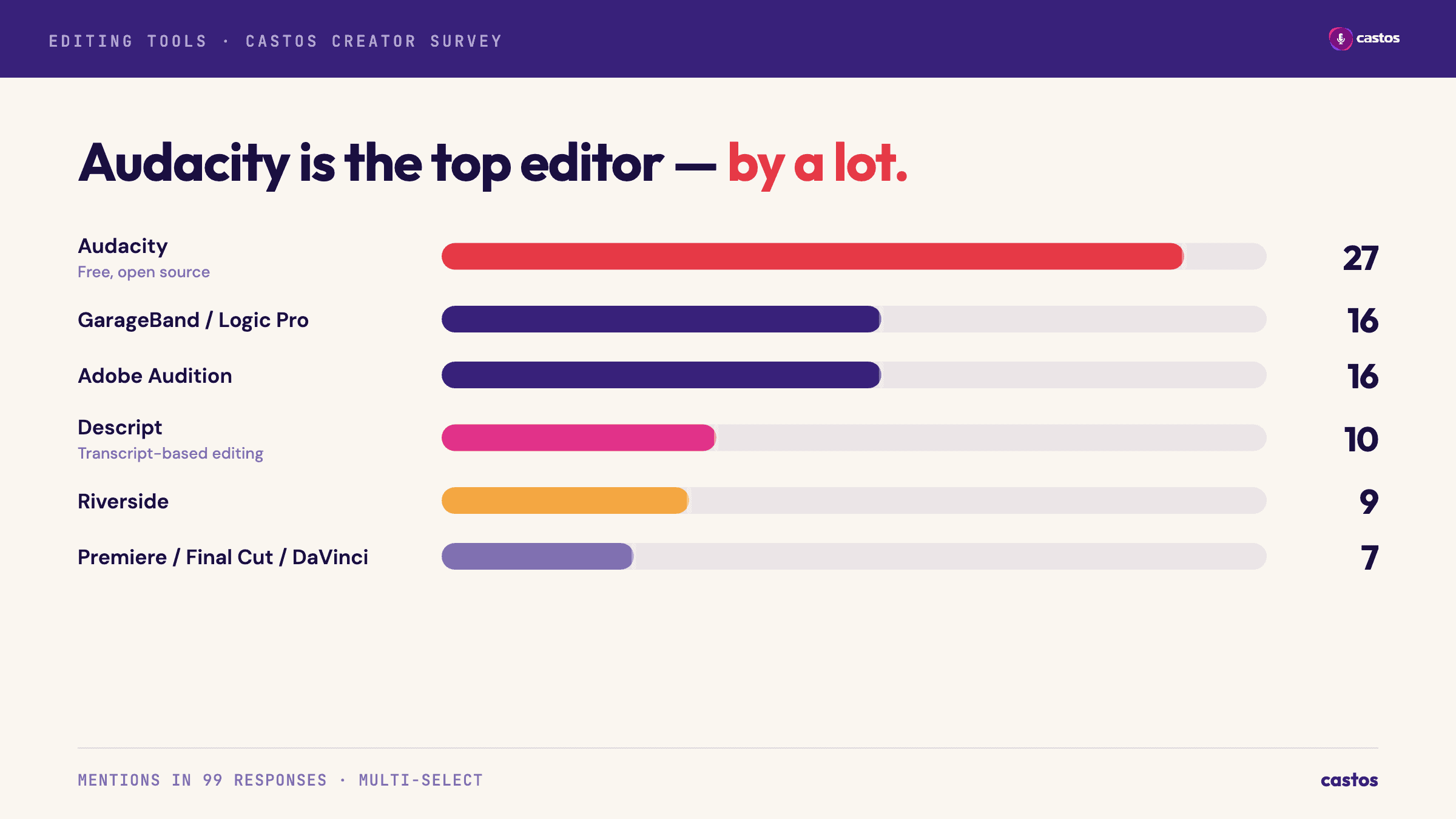
Audacity was the top editing tool by a wide margin. Adobe Audition and GarageBand/Logic Pro tied for second. Descript has real traction, mostly with people who like editing from a transcript. A smaller group uses Pro Tools, Reaper, or DaVinci Resolve. Some outsource editing entirely, and some do minimal editing or none.
None of those paths is wrong. The mistake is drifting between them with no decision behind it. Choose the path that matches your time and budget, then check it occasionally.
- Time one full edit from raw file to export. If it's more than 2-3x the episode length, something needs to change.
- Decide: edit yourself, use a transcript editor, or outsource. Write down why.
- If you use free software and it works, don't upgrade just because pro tools exist.
- If you skip editing, at least trim the dead air at the start and end, and check levels.
- Save one export preset so every episode leaves your editor with the same loudness and format.
- If you outsource, send the editor a short written brief covering cuts, intro/outro, and what to leave in.
Decide on video deliberately
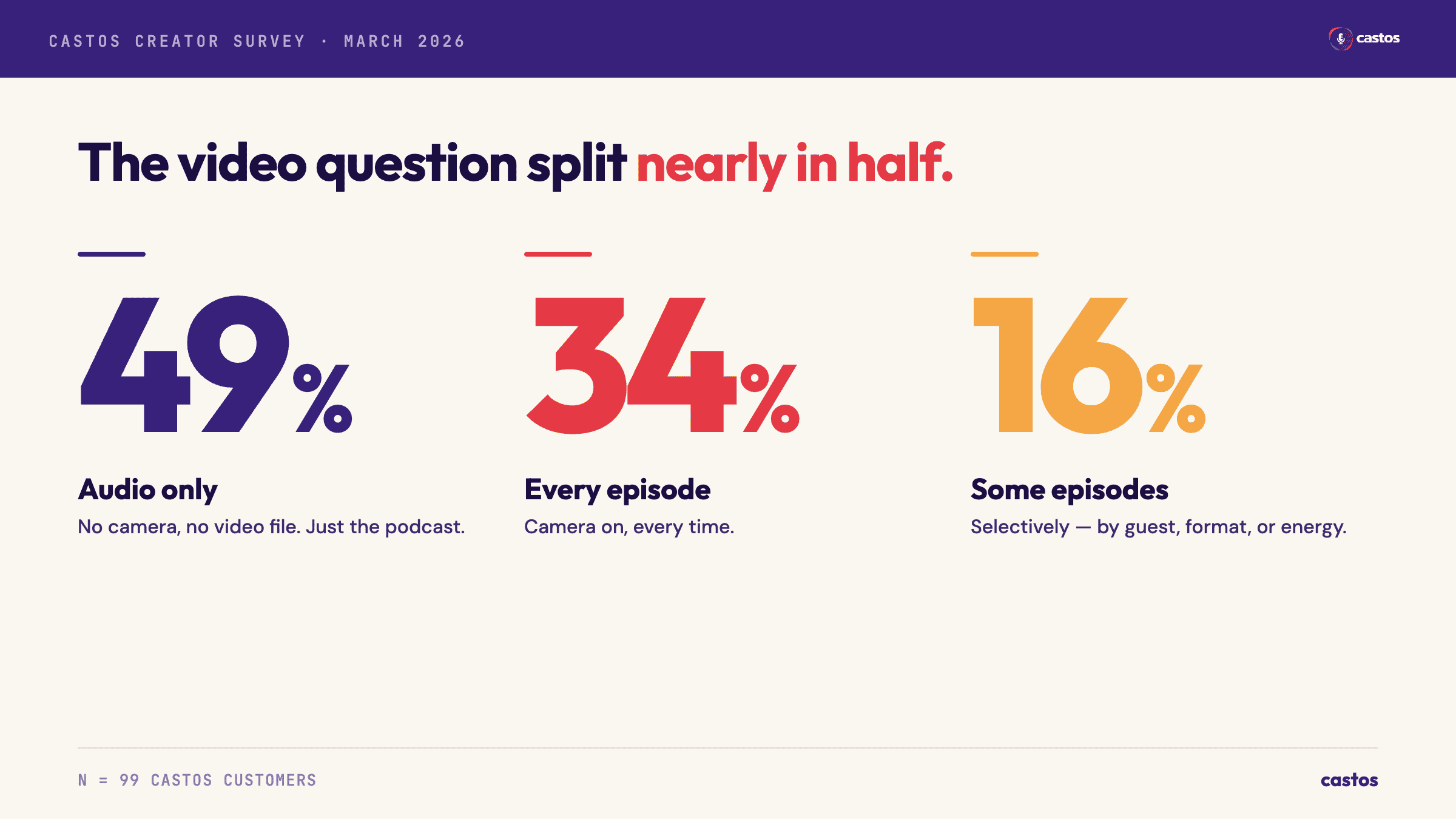
The survey split almost down the middle. 49% record no video, 34% record video for every episode, and 16% record it for some episodes. The pattern behind the numbers matters more than the numbers. Interview shows already recording guests through Riverside or Zoom get video almost for free. Solo shows and narrative formats mostly stay audio-only, often on purpose, to keep production simple.
Where video creators publish is lopsided. 82% post to YouTube, and 46% post clips to Instagram, TikTok, or Facebook. A smaller group embeds video on their own site or uses video hosting to reach directories that read video from RSS. One creator said adding video "greatly increased my workflow," and that's the honest cost. Another records video only to make the conversation better and never publishes it.
- Are you already recording remotely with video on? If yes, keep the files and decide what to do with them.
- Pick one video destination first (usually YouTube) before thinking about clips.
- Budget the extra time: video editing, thumbnails, titles, and uploads.
- Try video on a few episodes, such as a strong guest or a special format, before committing to every episode.
- If you only want better conversation, record video for yourself and publish audio only.
- Check whether your host can republish episodes to YouTube automatically so you skip a manual upload.
Choose tools that stay simple
When creators were asked what they want, the answer was less complexity. "Just reliable remote recording" came up repeatedly. One person wished their platform would stop adding features and fix the existing ones. That's a good filter for your own tool choices: reliability first, extras second.
Two other requests are worth watching. One creator flagged missing API access in recording tools as a blocker for AI-driven workflows. Several wanted to livestream and record from the same session. And the pushback on paid add-ons was clear: people don't want prices raised for features they won't use.
- Rank your tools by how often they fail you, not by feature count.
- Replace a tool only if it fails you repeatedly, not because a newer one launched.
- Check for API or export options if you plan to automate transcripts, clips, or show notes.
- Confirm a tool can handle live and recorded sessions if you stream and podcast from one take.
- Recheck monthly costs once a quarter and cut anything you haven't opened.

Leave a
comment