The gap between a professional-looking setup and a consumer one is smaller than the price difference suggests.
Most equipment decisions are made in the wrong order: someone buys a camera before they have fixed the audio, or spends money on lighting while still filming in front of a cluttered wall. The order matters more than the budget.
This checklist moves from the highest-impact improvements to the lowest. Start at the top. Add the next item when the previous one is covered.
Audio first: the non-negotiable
Viewers will forgive blurry footage more readily than they will forgive bad audio. This is the consistent finding across every survey of video audience behavior. Before you spend anything else, cover audio.
- A lavalier (clip-on) microphone - wired is more reliable than wireless for solo recording
- OR a USB condenser microphone on a desk arm, positioned 20–30 cm from your mouth
- A soft surface in the room - bookshelf, rug, sofa - to absorb echo (hard walls make audio sound hollow)
- Closed-back headphones to monitor your audio while recording
Lighting second: the visible upgrade
Good lighting changes how your footage looks more dramatically than any camera upgrade. A well-lit face on a phone outperforms a poorly lit face on a professional camera.
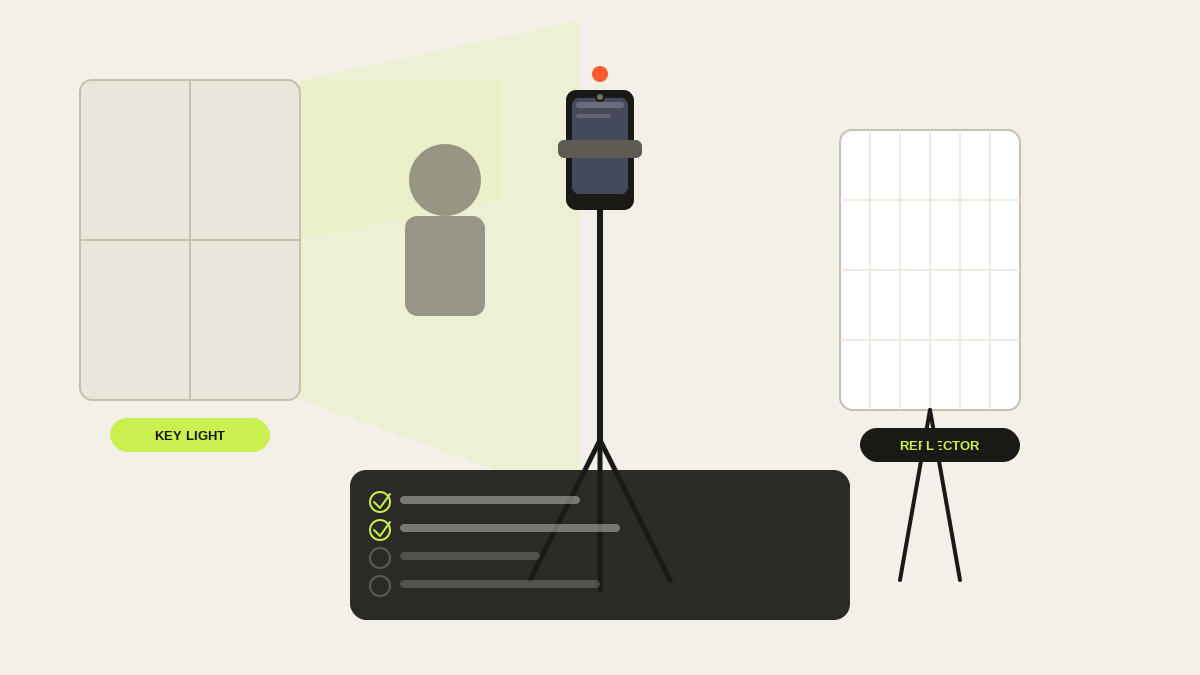
- A large window facing you - natural light is the best starting point, no cost
- A diffusion panel or white sheet to soften harsh window light on sunny days
- A single LED panel or ring light for days with no window light, positioned at 45 degrees from your face
- A white foam board on the opposite side of your key light to fill in shadows - cheap and effective
Camera third: the last upgrade
With good audio and lighting, the camera matters less than people assume. A modern smartphone on a tripod with good light produces footage that most audiences cannot distinguish from a dedicated camera.
- Your current smartphone - test with what you have before buying anything
- A tripod or flexible arm mount to keep the phone stable at eye level
- A webcam rated at 1080p minimum, if recording at your desk for screen content
- A mirrorless camera with a kit lens - only if the smartphone genuinely limits what you can produce
Background and set
- A clean, uncluttered space you can set up and leave - consistency matters more than design
- One intentional object in frame: a plant, a shelf, a simple lamp. One, not ten.
- A background that does not compete with your face - neutral colours (grey, off-white, dark blue) hold attention on you
- Consistent placement - the same frame across videos signals professionalism to returning viewers
What to skip or delay
| Item | Skip if… | Add when… |
|---|---|---|
| Wireless lavalier mic | Wired clips are stable and you film at a desk | You move while filming or film outdoors regularly |
| Second light (backlight/hair light) | You have one solid key light | You want to separate yourself from the background more |
| Teleprompter | You script and film naturally | You film long pieces to camera and stumble on long sections |
| Green screen | You have a usable physical background | You need to film in different 'locations' without moving |
Leave a
comment